Shopify ShopStable
Built to sell and ship products Built for quotes, bookings, and local jobs
Hours of setup and theme tweaking A professional site in an afternoon
Monthly fee before you add anything Free to start
Booking and CRM need paid apps Quote inbox and CRM included
You drive all your own traffic Found in the local marketplace
See the full comparison
Wix ShopStable
A blank canvas to design yourself Prebuilt for local service businesses
Advanced lead tools cost extra Quote inbox and CRM included
A website, but no local marketplace A website plus a local marketplace
You drive all your own traffic Found by nearby customers
Add-ons stack up your bill The essentials in one plan
See the full comparison
Angie's List ShopStable
A directory profile, not a website A real website on your own domain
Lead prices vary by trade and season One flat rate per lead
Annual contracts to cancel Free to start, no contract
Your brand lives on their site Your brand, your storefront
No website builder Full website builder included
See the full comparison
Thumbtack ShopStable
Lead prices set dynamically One flat rate per lead
A profile on their platform A real website on your own domain
Built around their marketplace A website plus a local marketplace
They keep your reviews and data Your customers and reviews are yours
No website builder Full website builder included
See the full comparison
Pricing
List your business

ShopStable Website Builder

The site in your head, live by dinner.

You built a business. You can build a website. Everything here moves the way your hands expect: no code, no guesswork, no design degree.

Free to start. No card required.

Scroll to build one

Watch a site come together

Home Publish
summitlandscaping.shopstable.com Live

Summit Landscaping

Outdoor spaces, built to last.

Get a quote

Patios, plantings, and stonework for homes across Bend.

Licensed and insured. Free estimates, honest timelines.

The canvas

Every site starts blank

One empty page and one button. Yours takes an afternoon, not a weekend course.

01 · Sections

Add a section

Sections are the big building pieces of a page. Click, and one drops onto the canvas.

02 · Rows and columns

Split it into columns

Rows and columns shape the layout. Pick a split and the structure is just there.

03 · Resize

Drag to resize

Grab the handle between columns and pull. The numbers follow your hand.

04 · Content

Put your business in it

Your photos, your words, and a button that asks for the job.

05 · Design

Pick your look once

Colors and type live on one Design page. Change them there and they change everywhere.

06 · Publish

You are live

On your own address, with your own name on it. Not a profile on someone else's platform.

Start free
Marketplace

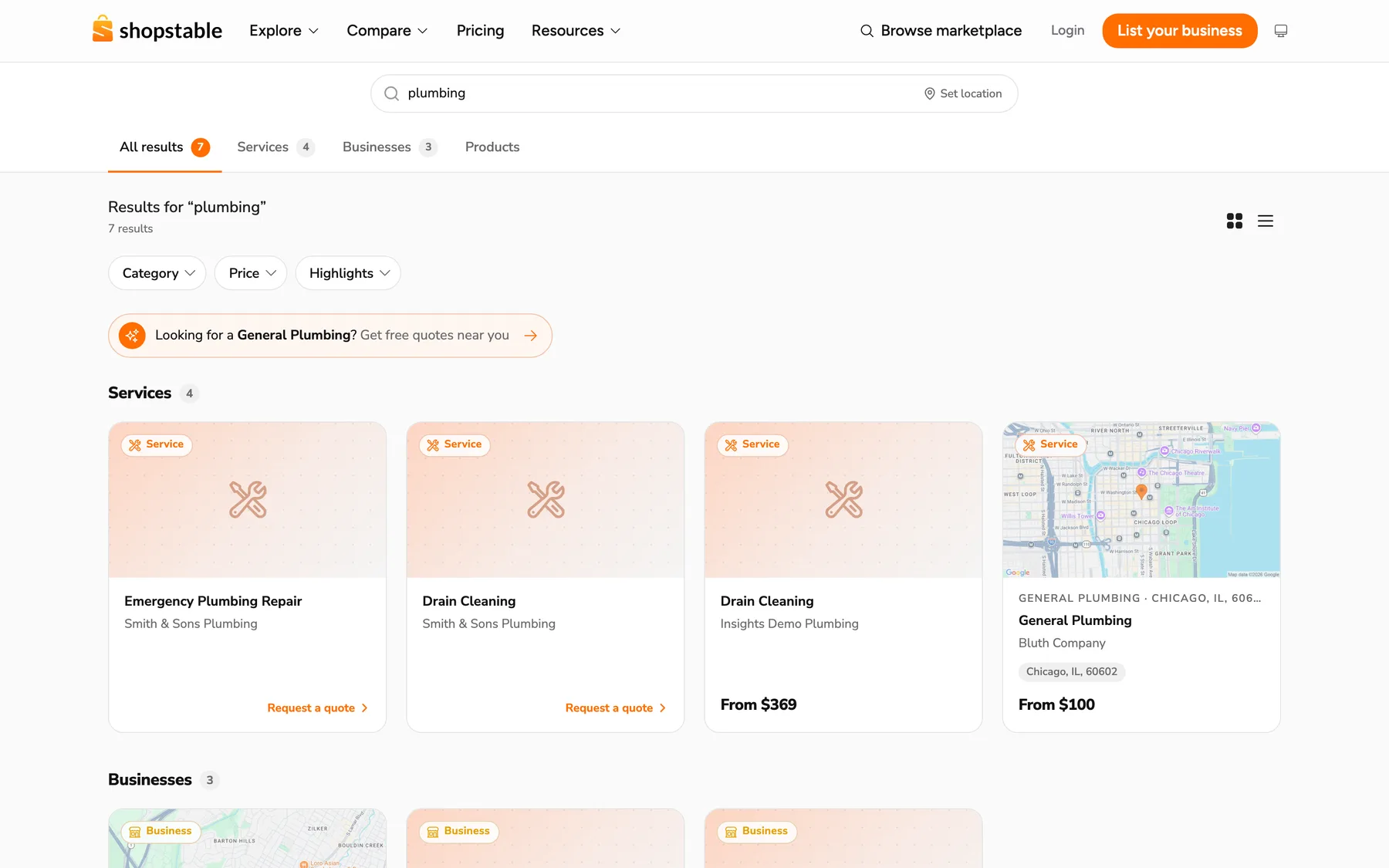
A website that brings you customers

Every other builder hands you a website and wishes you luck with traffic. Every ShopStable website comes with a listing in the local marketplace, where nearby customers already search by trade and zip code. When someone needs what you do, your site is the answer, and their quote request lands in your inbox with their details attached.

Start free
The ShopStable marketplace: a search for plumbing showing local services and businesses with request-a-quote buttons
Premade sections

Skip the blank page. Start from finished sections.

A dozen full sections, built and ready: heroes, feature rows, proof cards, FAQs, calls to action. Drop one in and it arrives finished, with real layout and structure, already wearing your colors and fonts. Swap in your words and photos and move on. Every piece stays fully editable.

Product Hero Story Tabs Video Welcome Feature Rows Market Panels Proof Cards Promise Band FAQ Split CTA Band Audience Split Offer Cards Promo Banner
Rows · Columns

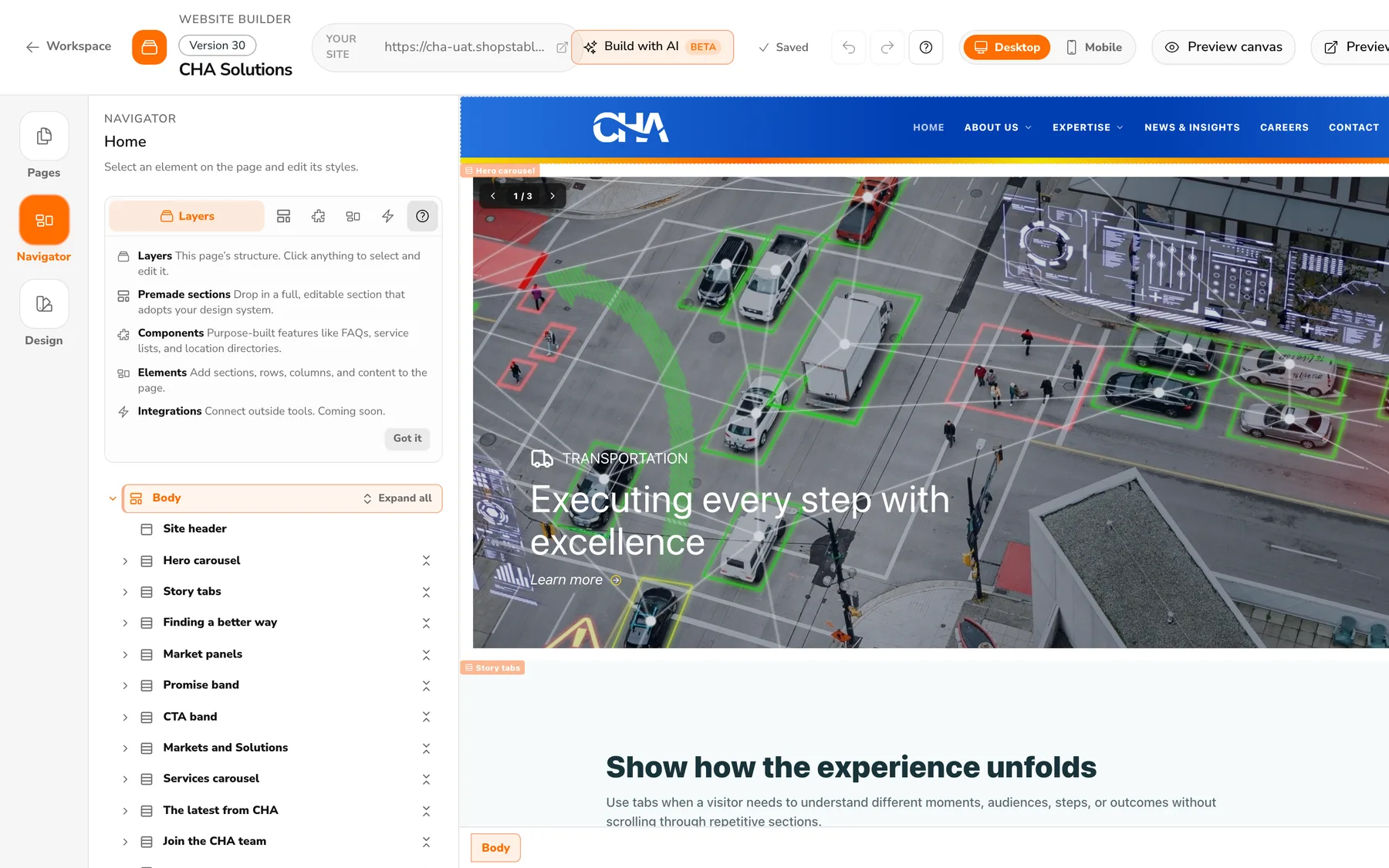
The exact layout you want, without the fight

Other builders lock you into their grid and make you work around it. Here, rows nest inside columns and columns inside rows, panels stack to equal heights, and the canvas shows real sizes while you drag. If you can describe a layout with your hands, you can build it.

The Website Builder editor: a full business site on the canvas, with the page structure listed in the navigator panel
  • Resize by dragging. Grab the handle between columns; sizes update live as you pull.
  • Nest when you need to. A row inside a column is still just a row. No jargon, no modes.
  • Stacks that line up. Equal-height panels and no-gap stacking, without fighting the layout.
Design

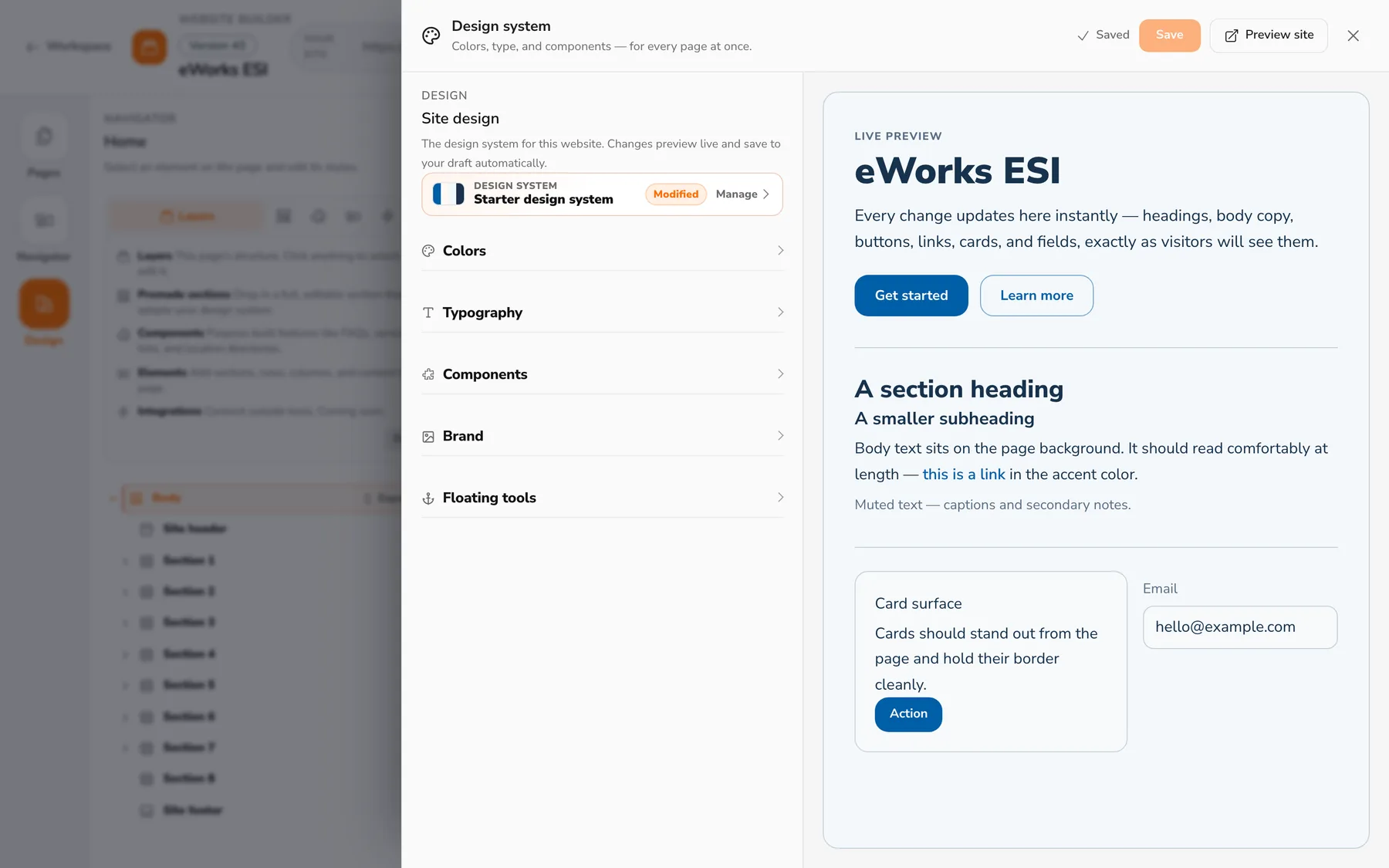
Change your colors once. Everything updates.

No hunting through pages restyling buttons one by one. Your colors, type, components, and brand live in one design system with a live preview: change a color there and every page, button, and card follows instantly. What you approve is exactly what visitors get.

The Design page: colors, typography, components, and brand settings beside a live preview of headings, buttons, cards, and fields
Forms · Quote inbox

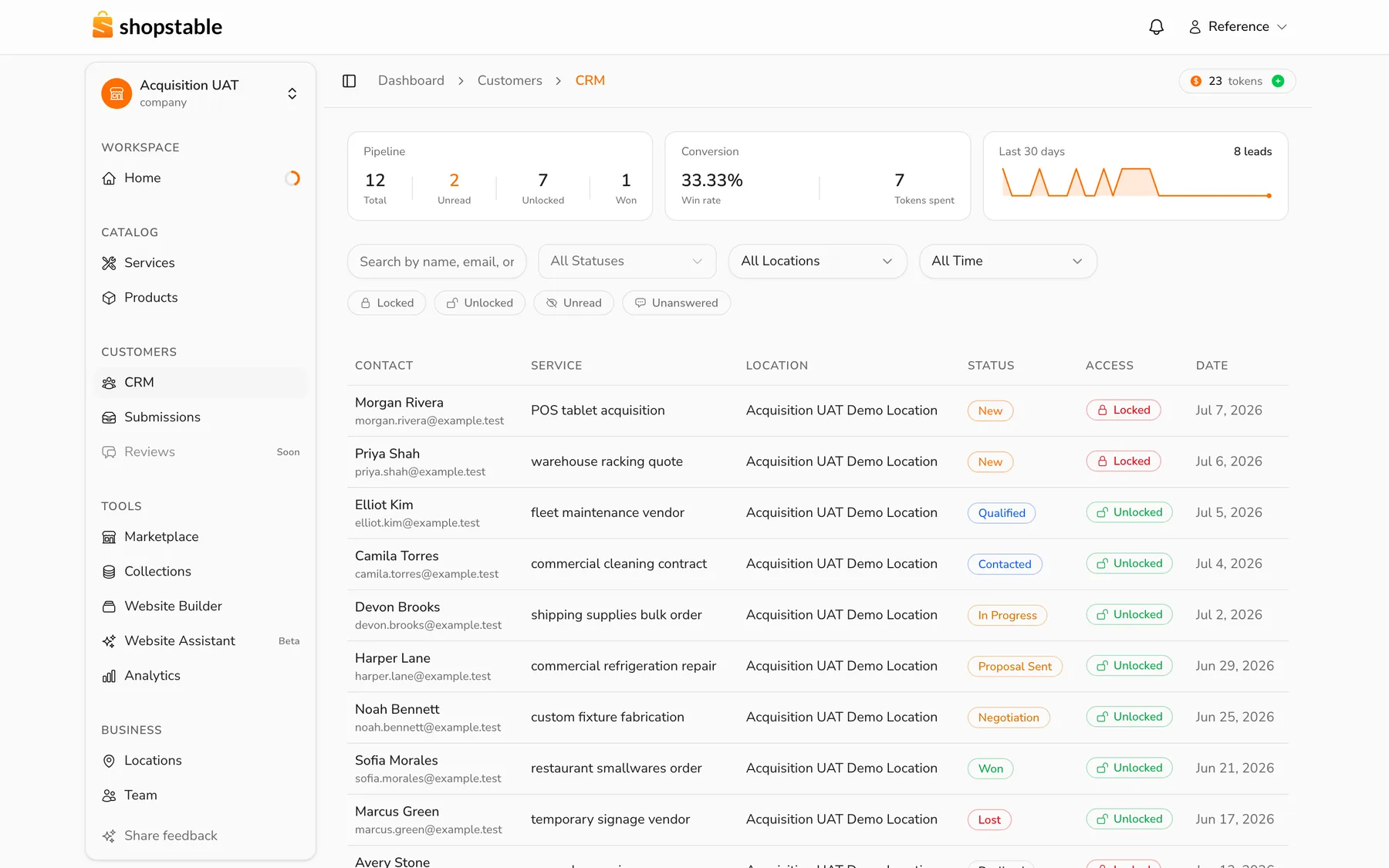
Form requests land in your inbox. Nothing to wire up.

Every component on this canvas is already connected to your business. Service lists pull your real services, the map knows your locations, testimonials hold your reviews, and every form posts straight to your quote inbox with the customer's details, status, and history attached. No plugins, no integrations, no duct tape.

Contact form Gallery Carousel Tabs Testimonials FAQ Collections Map
The quote inbox: a pipeline of customer requests with statuses from new through won, conversion stats, and a 30-day trend
Phone · Tablet · Desktop

Looks right on every phone. No extra work.

Most of your customers will meet your site on a phone, so phone layouts are not an afterthought you pay someone to fix later. Every section adapts on its own. Flip the preview to any device while you build, and publish knowing it holds up.

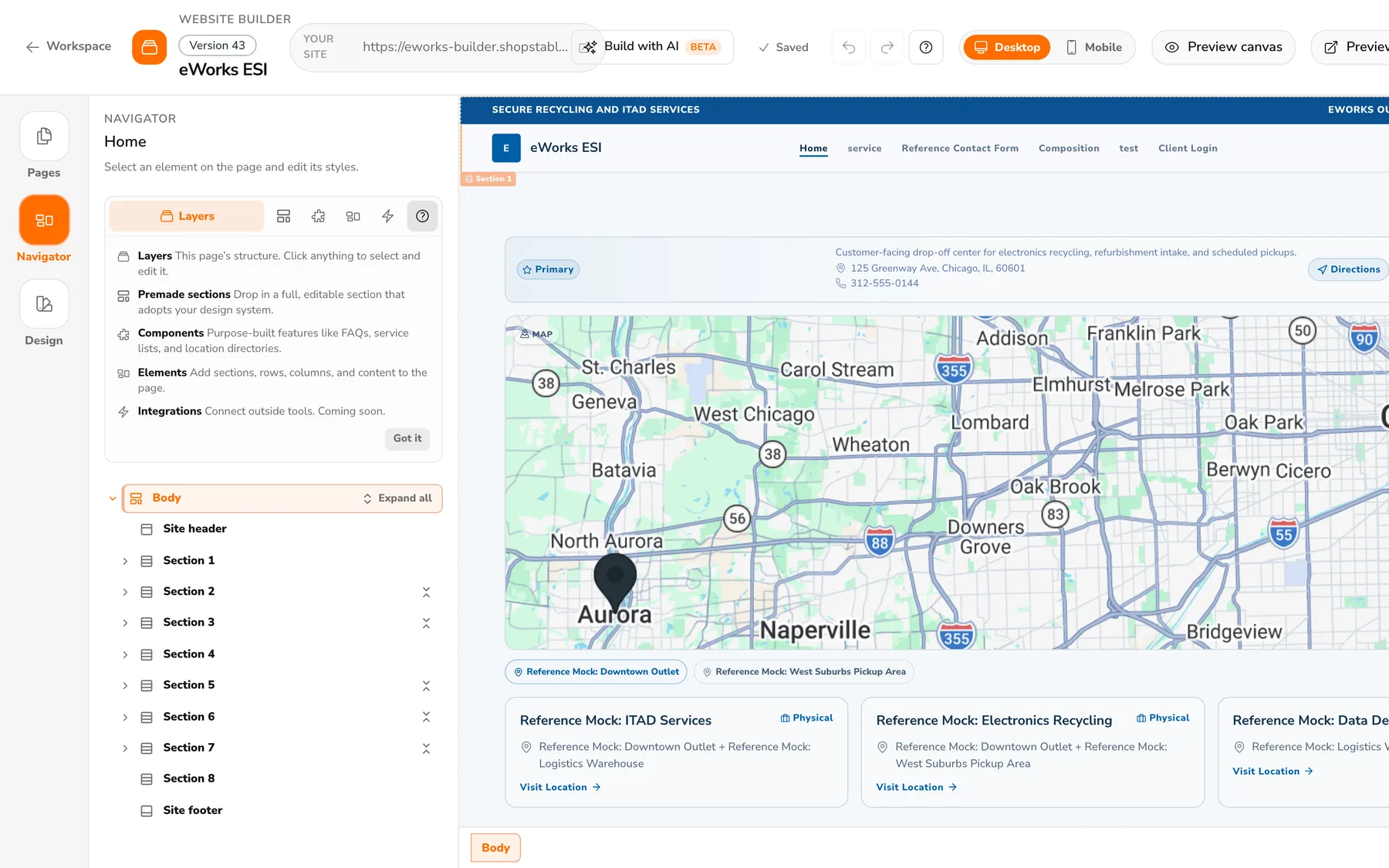
Desktop preview: a business site with a locations map on the editor canvas
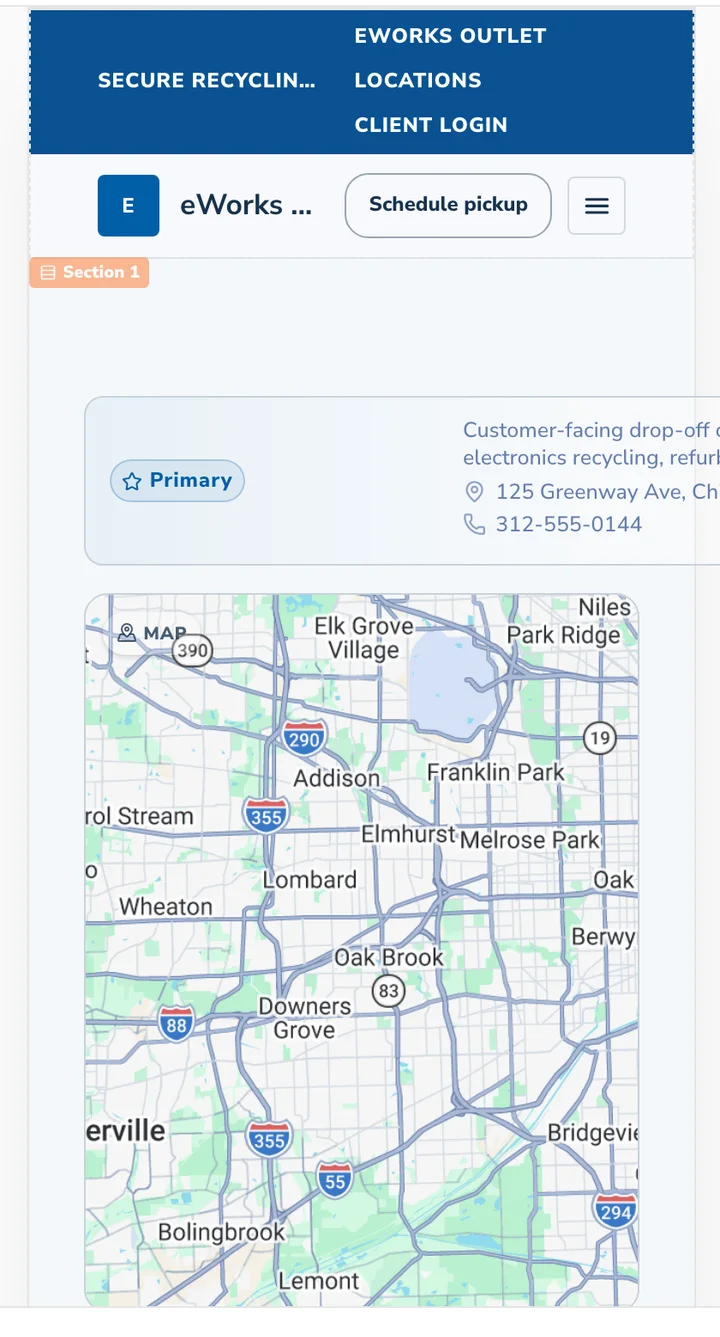
The same site in the phone preview: collapsed navigation and stacked content
Website Assistant

Move your site in. Skip the rebuild.

Hand the Website Assistant your current website and watch it come back rebuilt from ShopStable's curated sections and components. Not a screenshot of your old site: a clean, editable one. Galleries become galleries, forms become forms feeding your quote inbox, and every piece works like everything else on this page.

  • Import from anywhere. If your site is on the web, it can move in. Choose a faithful copy, or keep your brand and modernize the rest.
  • Matched to real components. The assistant maps what your old site does to our curated elements, so nothing arrives as a dead image or a locked block.
  • Then keep asking. New pages, new sections, a new look for spring: describe it and watch it land on the canvas, live. Publishing stays in your hands.

We think of it as rocket fuel for getting your website off the ground. This is what building looks like now.

How the Website Assistant works
Drafts · Publishing

You can't break your live site

Edit as boldly as you like: your live site never changes until you say so. All work happens on a private draft version. Preview it on every device, then publish the whole thing in one step. The previous version is kept, in case you ever want it back.

The difference

Why owners pick ShopStable over Wix and Squarespace

Wix, Squarespace, and GoDaddy will get you a website. Then you are on your own: your own traffic, your own plugins, your own lead services. ShopStable is built for the part that comes after publish.

You bring all of your own traffic
A local marketplace sends customers to you
Lead services with bidding and markups
Flat-rate quote requests, no bidding
Forms need plugins and setup
Every form is wired to a built-in quote inbox and CRM
Moving in means starting over
The Website Assistant imports your site, matched to real components
Templates you restyle by hand
Premade sections that adopt your design automatically
One wrong click edits the live site
Drafts and versions keep your live site safe until you publish
Built for you to work alone
Invite your team, with control over what each person can touch
Questions

Questions owners actually ask

How much does the website builder cost?

Building is free on every ShopStable account, with no card required. Publishing your site live is part of ShopStable's paid plans, and every plan includes your marketplace listing and quote inbox. See pricing for current plans.

Can I move my website over from Wix, Squarespace, GoDaddy, or WordPress?

Yes. The Website Assistant imports any site on the web and rebuilds it here by matching what it finds to ShopStable's curated sections and components. Choose a faithful copy, or keep your brand and modernize the rest. How importing works.

Can I build my website with AI?

Yes. Tell the Website Assistant what you want, and watch it happen on the canvas live. It works with the same sections, rows, and columns you do, so you can take over at any point. Publishing always stays in your hands.

Are there premade sections I can modify?

Yes. A dozen premade sections, from heroes to FAQ blocks, drop in finished and adopt your colors and fonts automatically. Every piece stays fully editable, down to individual rows, columns, and elements.

Can I invite my team?

Yes. Team collaboration is included with Professional plans. Invite your office manager or business partner, control which areas each person can touch, and work on the same draft together.

Can my website be live today?

Yes. Most owners assemble their site in an afternoon: start from premade sections or import your old site, swap in your words and photos, and publish to your own address. Custom domains are supported.

Do I need to know code or design?

No. Everything on the canvas moves by dragging, sizes update as you pull, and your design system keeps everything matching. If you can fill in a form, you can build this site.

Can I break my live site while editing?

No. All editing happens on a private draft. Your live site never changes until you publish, and the previous version is kept in case you want it back.

Will my site look right on phones?

Yes. Every section, row, and column adapts to phones and tablets on its own, and you can preview any device while you build.

Set it up in an afternoon.
Then get back to work.

A real website on your own address, a listing in the local marketplace, and quote requests delivered to one inbox. Free to start.

Start free

No card required. Your site, your customers, your data.

We use cookies to improve your experience. By continuing to use this site, you consent to our use of cookies. See our Privacy Policy for details.