

Shopify ShopStable
Built to sell and ship products Built for quotes, bookings, and local jobs
Hours of setup and theme tweaking A professional site in an afternoon
Monthly fee before you add anything Free to start
Booking and CRM need paid apps Quote inbox and CRM included
You drive all your own traffic Found in the local marketplace
See the full comparison
Wix ShopStable
A blank canvas to design yourself Prebuilt for local service businesses
Advanced lead tools cost extra Quote inbox and CRM included
A website, but no local marketplace A website plus a local marketplace
You drive all your own traffic Found by nearby customers
Add-ons stack up your bill The essentials in one plan
See the full comparison
Angie's List ShopStable
A directory profile, not a website A real website on your own domain
Lead prices vary by trade and season One flat rate per lead
Annual contracts to cancel Free to start, no contract
Your brand lives on their site Your brand, your storefront
No website builder Full website builder included
See the full comparison
Thumbtack ShopStable
Lead prices set dynamically One flat rate per lead
A profile on their platform A real website on your own domain
Built around their marketplace A website plus a local marketplace
They keep your reviews and data Your customers and reviews are yours
No website builder Full website builder included
See the full comparison
Pricing
List your business

Dashboard Overview

The ShopStable dashboard is your central hub for managing your business. Here's what you'll find.

Navigation
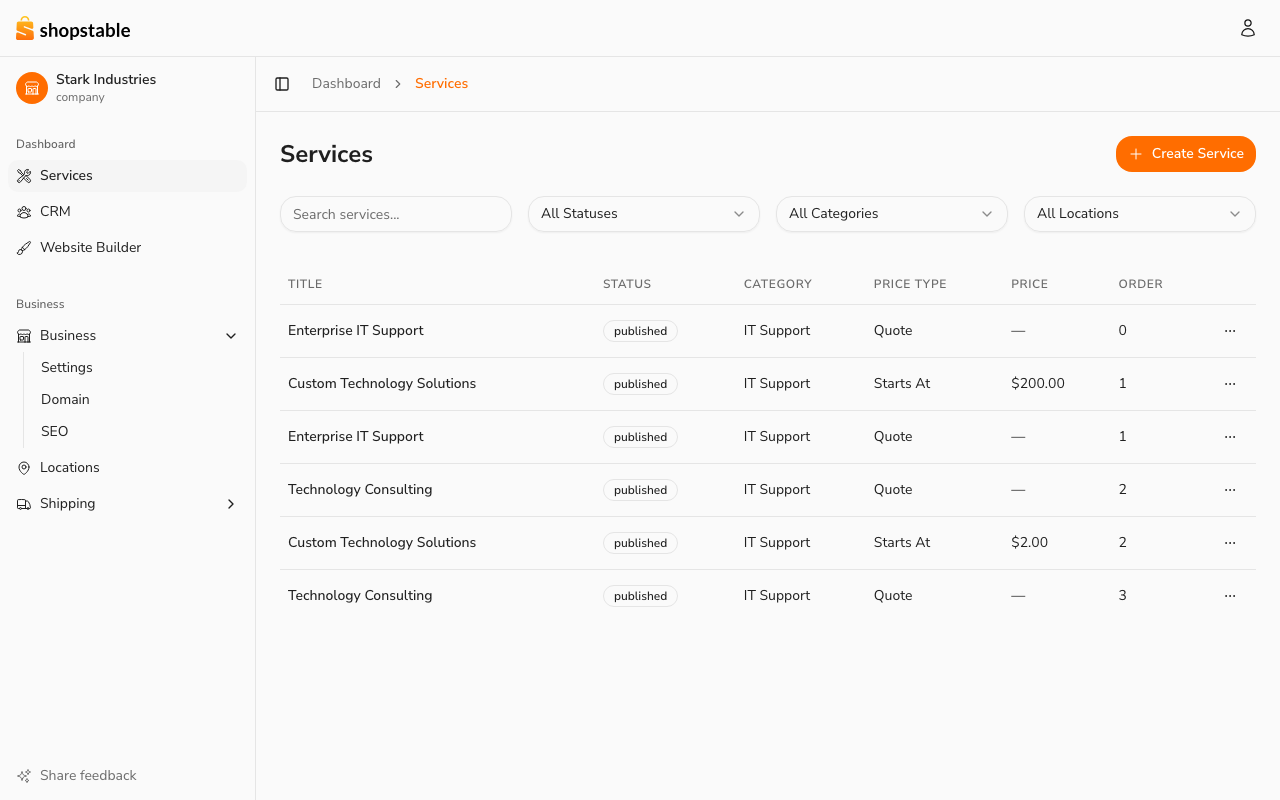
The business dashboard. The left sidebar groups every management area; the active business is shown at the top.

The dashboard sidebar gives you quick access to every management area for your business:

  • Services — your service listings, pricing, and availability.
  • CRM — customer inquiries (leads), conversion stats, and follow-ups.
  • Marketplace — review your public marketplace listing.
  • Analytics — traffic and lead performance.
  • Business → Settings / Domain / SEO — business profile, custom domain, and search settings.
  • Locations — your business locations and hours.
  • Shipping — shipping charges and order tracking (if you ship products). You arrange shipping labels and delivery with your carrier.

The active business is shown at the top of the sidebar with its logo. Visiting /dashboard lands on Services by default.

Switching Between Businesses

If you manage multiple businesses on ShopStable, switch between them from the user menu in the marketplace header (top-right) or from Account → Businesses. Each business has its own independent dashboard, services, locations, and settings.

Getting Help

From any page in the dashboard, you can:

  • Visit the Help Center for guides and documentation
  • Contact Support for direct assistance

Still have questions?

Contact Support
We use cookies to improve your experience. By continuing to use this site, you consent to our use of cookies. See our Privacy Policy for details.