

Shopify ShopStable
Built to sell and ship products Built for quotes, bookings, and local jobs
Hours of setup and theme tweaking A professional site in an afternoon
Monthly fee before you add anything Free to start
Booking and CRM need paid apps Quote inbox and CRM included
You drive all your own traffic Found in the local marketplace
See the full comparison
Wix ShopStable
A blank canvas to design yourself Prebuilt for local service businesses
Advanced lead tools cost extra Quote inbox and CRM included
A website, but no local marketplace A website plus a local marketplace
You drive all your own traffic Found by nearby customers
Add-ons stack up your bill The essentials in one plan
See the full comparison
Angie's List ShopStable
A directory profile, not a website A real website on your own domain
Lead prices vary by trade and season One flat rate per lead
Annual contracts to cancel Free to start, no contract
Your brand lives on their site Your brand, your storefront
No website builder Full website builder included
See the full comparison
Thumbtack ShopStable
Lead prices set dynamically One flat rate per lead
A profile on their platform A real website on your own domain
Built around their marketplace A website plus a local marketplace
They keep your reviews and data Your customers and reviews are yours
No website builder Full website builder included
See the full comparison
Pricing
List your business

Managing Your Subscription

All subscription and billing management is handled through your ShopStable account.

Viewing Your Subscription
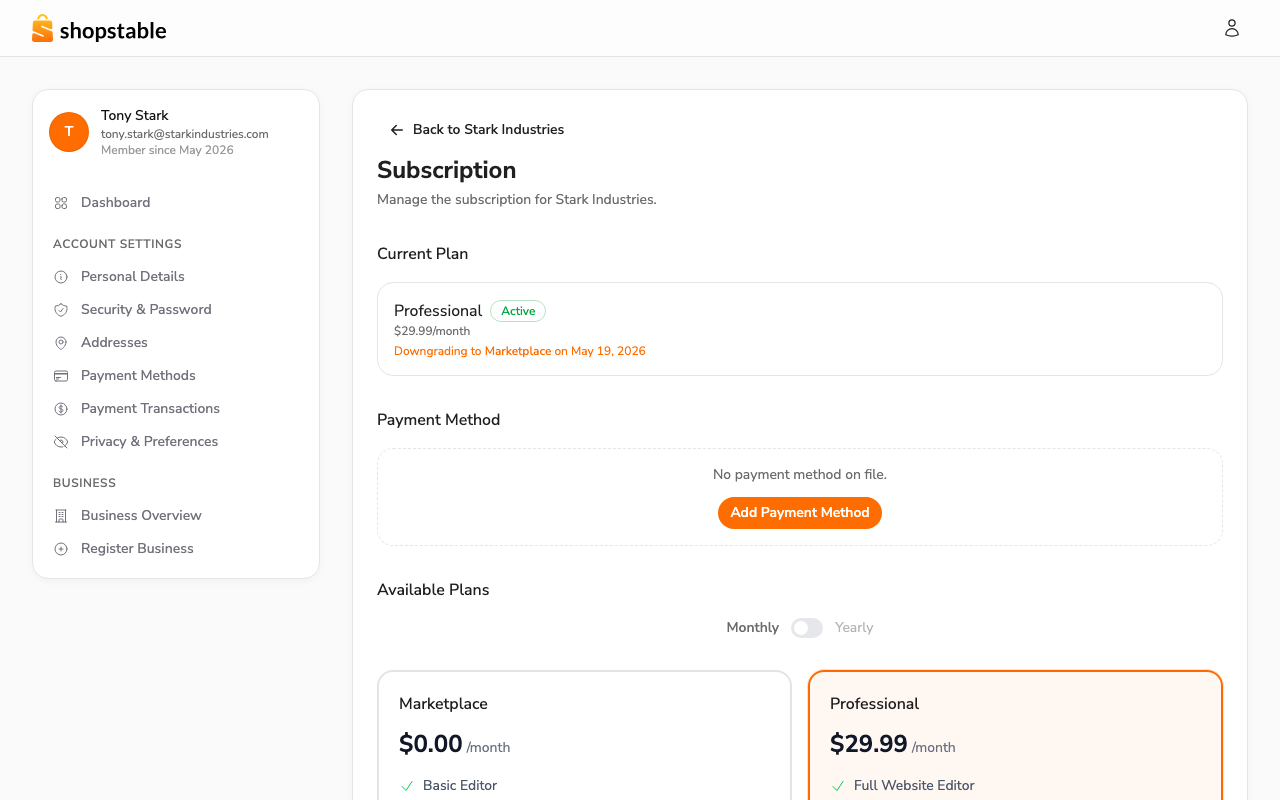
Your business subscription page — current plan, next billing, payment method, and billing history.

Subscriptions are scoped to each business. From the account menu, open Businesses → {your business}, then click Subscription on the business detail page. You'll see:

  • Your current plan and status
  • Next billing date and amount
  • Payment method on file
  • Available plans for upgrade or downgrade
  • Billing history for this business

Updating Your Payment Method

To update your payment method:

  1. Open Account → Payment Methods.
  2. Click Add Payment Method.
  3. Enter your new card details.
  4. Set the new card as your default payment method.

We accept all major credit and debit cards through Stripe.

Viewing Billing History

Your complete billing history is at Account → Payment Transactions. Each entry shows:

  • Date and amount
  • Plan or product purchased
  • Payment status (paid, pending, failed)
  • A link to download the invoice

Canceling Your Subscription

If you need to cancel:

  1. Open Businesses → {your business} → Subscription.
  2. Click Cancel Subscription.
  3. Confirm your cancellation.

Your access continues until the end of your current billing period. You can resubscribe at any time.

Failed Payments

If a payment fails, we'll notify you by email and retry the charge. To resolve a failed payment:

  1. Check that your payment method is up to date
  2. Ensure your card has sufficient funds
  3. Update your payment method if needed

If payments continue to fail, your subscription may be paused until the balance is resolved.

Need Help?

For billing questions or disputes, contact our Support team. We're happy to help with any billing concerns.

Still have questions?

Contact Support
We use cookies to improve your experience. By continuing to use this site, you consent to our use of cookies. See our Privacy Policy for details.